![[React] 이미지 위치에 따른 오류 해결 You can either move it inside src/, or add a symlink to it from project's node_moules/.](https://img1.daumcdn.net/thumb/R750x0/?scode=mtistory2&fname=https%3A%2F%2Fblog.kakaocdn.net%2Fdna%2FM93d7%2FbtrRDZ2TsEv%2FAAAAAAAAAAAAAAAAAAAAAJewTwd2s2AnofH7HkPJy_4lYNq1LGGVpQe42xRxr2e9%2Fimg.png%3Fcredential%3DyqXZFxpELC7KVnFOS48ylbz2pIh7yKj8%26expires%3D1782831599%26allow_ip%3D%26allow_referer%3D%26signature%3Do%252Fd%252BzOg3rqg6UtJML2PDmqGcBDo%253D)
jsx 파일에서 이미지를 import 하기 위해 경로를 지정했는데 다음과 같은 오류가 발생했다.
Module not found: Error: You attempted to import ../../../public/assets/icons/ArrwTop.svg which falls outside of the project src/ directory. Relative imports outsde of src/ are not supported.
You can either move it inside src/, or add a symlink to it from project's node_moules/.
원인
CRA에서 컴파일은 src 내부에서만 일어나는데, 이때 js에서 import된 이미지와 같이 엮여있는 파일들은 모두 컴파일 대상이다.
따라서 이미지를 js 파일에 import 해오는 경우이거나, css 파일에서 background-image로 사용되는 경우라면, 이미지가 src 폴더 내부에 있어야 한다. (public 폴더는 우리가 CRA를 배포했을 때 실제 서버에 배포되는 폴더)
참고로 img의 src 속성으로 바로 불러오는 경우에는 컴파일 이후에 index.html 기준으로 이미지를 불러오기 때문에 public 내부에 있어야 한다.
해결
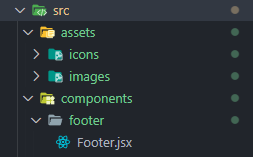
이미지 파일들이 있는 assets 폴더를, src 폴더 바깥의 public 폴더에서 src 폴더 내부로 이동시켜주어 해결할 수 있다.
출처